MRK Media Suite - Virtual DJ Video Effects plugin for Virtual DJ
Is a powerful video overlay and media management plugin for VirtualDJ that transforms your DJ setup into a complete multimedia experience. Display videos, images, GIFs, text overlays, and interactive SMS messages with professional-grade controls and stunning visual effects.
From $14.99
Choose a licence

MRK Media Suite v4 – Feature List
General
VirtualDJ video effect plugin (64-bit)
Modern HTML control panel
12 colour themes
Keyboard shortcuts for every tab
Quick-access live bar: message, next singer, adverts
One-click installer
Media
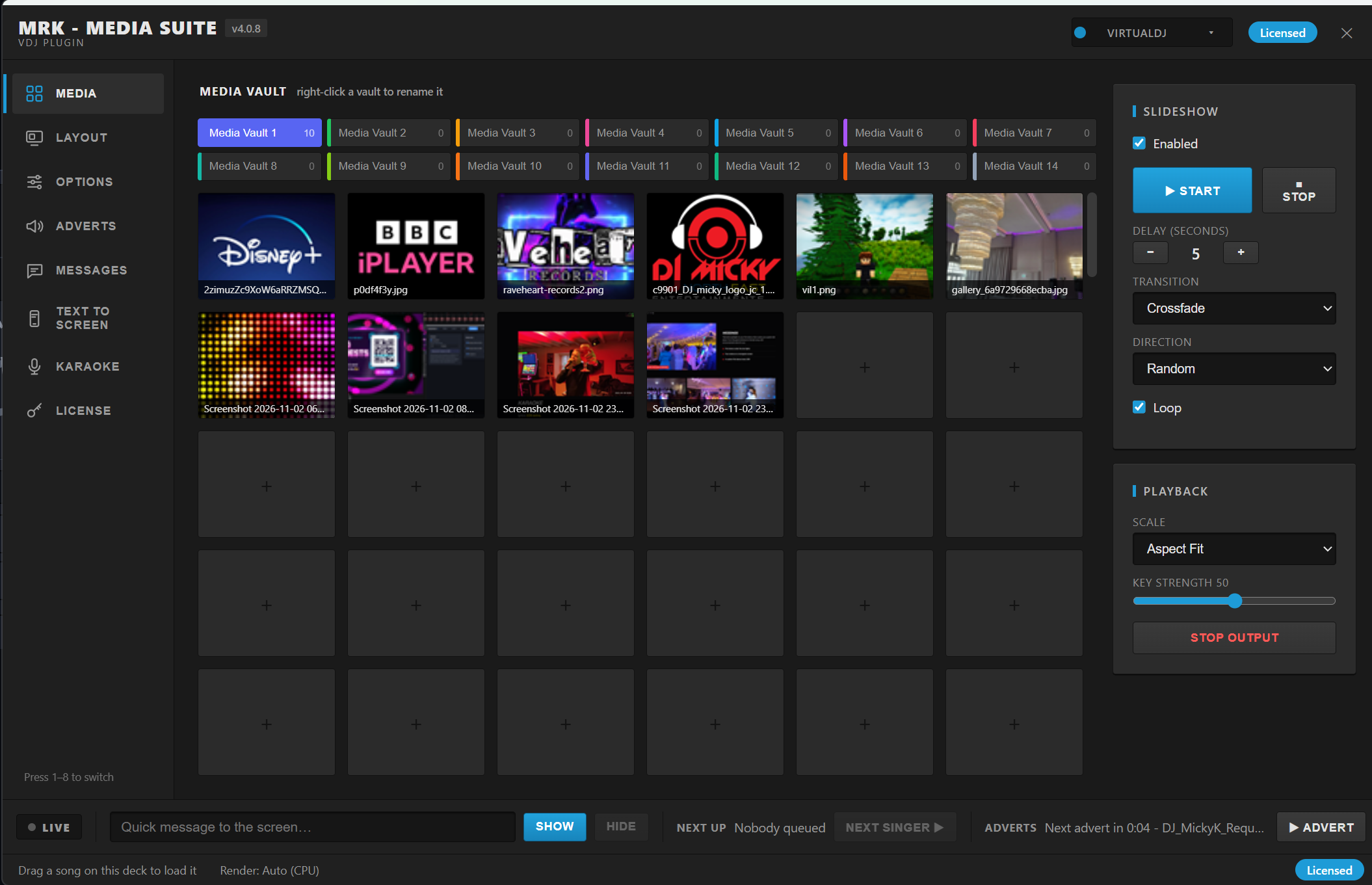
14 Media Vaults with 200 slots each
Custom vault names and colours
Images, videos and transparent PNG-MOV clips
Slideshow with timed delay
Cut, Fade and Crossfade transitions
Forward, Backward and Random order
Loop playback
Aspect Fit, Stretch and No Scale modes
Green screen and black background removal with adjustable strength
Auto, CPU and GPU render modes
Layout & Panels
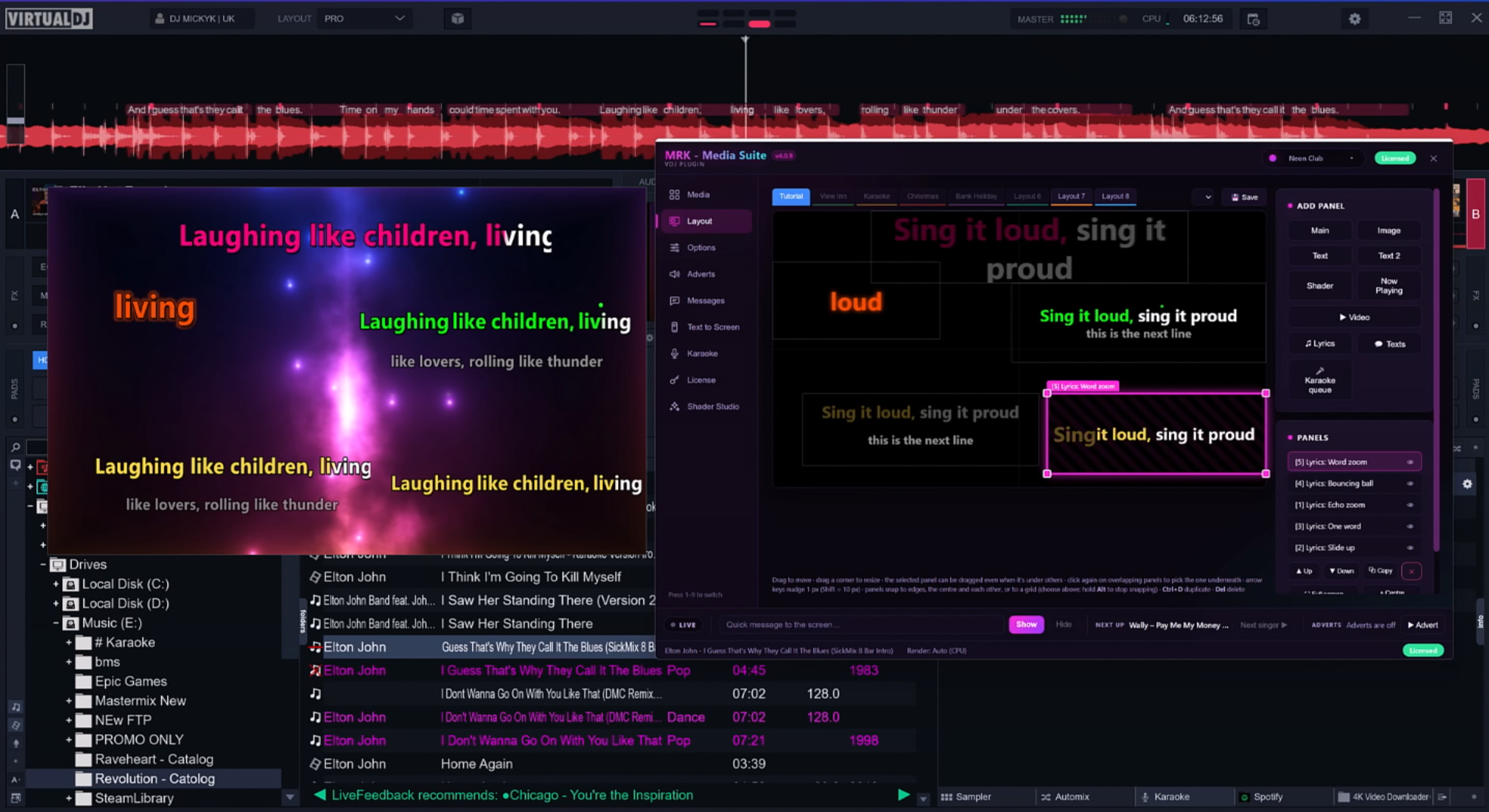
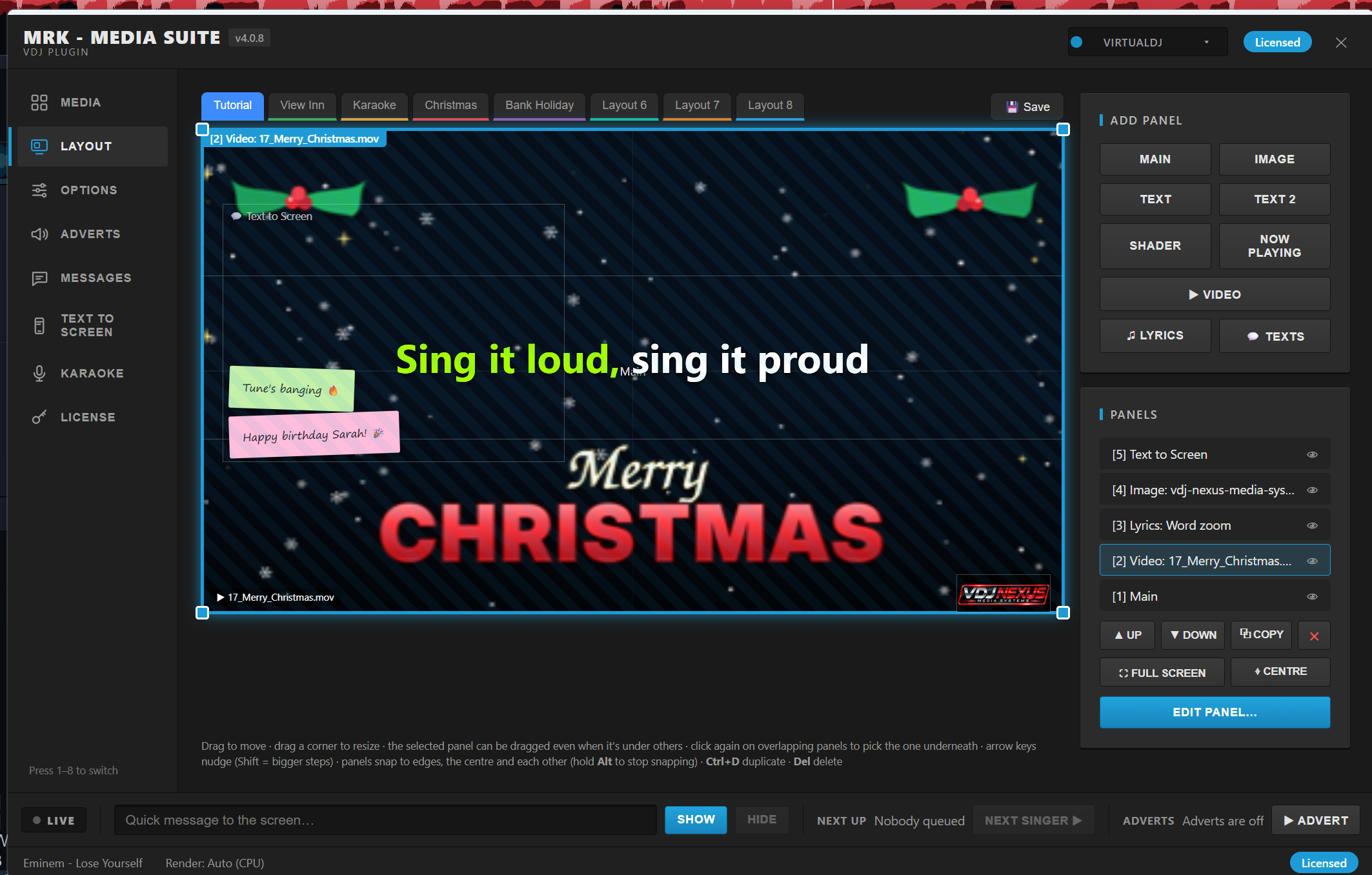
Drag-and-drop layout editor
Main, Image, Text, Text 2, Shader, Now Playing, Video, Lyrics and Text to Screen panels
Layer ordering, copy, full screen and centre tools
Per-panel fonts, colours, opacity, outlines and backgrounds
11 text animations, including beat-reactive pulse, Typewriter, Wave and Neon
16 image animations, including Ken Burns and beat-reactive effects
Now Playing panel with scrolling and bounce
Looping video panels
Save and load layouts
Shaders & Visuals
27 built-in audio-reactive shaders across 2 packs
Load your own shaders (.cso / .vdjshader)
VDJ Shader Converter tool
Shader browser with previews
Auto-disable shaders on karaoke
Beat and audio sync
Lyrics
Automatic lyrics: online, from VirtualDJ, from MP3 tags or from lyric files
Synced, timed lyrics
Lyrics search and pick
Per-song timing adjustment
21 lyric styles: Karaoke fill, Bouncing ball, Spotlight, Word pop, Scrolling, Fade, Zoom in, Zoom out, Pulse, Slide up, Drop in, Echo zoom, Flip, Breathe, Word zoom, Word fade, Spin zoom and more
Countdown dots before vocals
Karaoke
Karaoke queue manager
VirtualDJ Karaoke list sync
“Next up” singer cards and banner
Auto-advance to the next singer
Auto-hide panels and slideshow during karaoke
Messages & Countdown
Live on-screen messages
Saved message list
Countdown timer with custom heading and finish message
Adjustable position, size and colours
Auto-hide during karaoke
Text to Screen
Guests text a number to put messages on screen
ClickSend and Twilio support
Auto-show or approve-first moderation
Blocked words filter
Phone numbers masked on screen
22 text designs, including Phone bubbles, Neon, Comic, Chat cards, Sticky notes, Frosted glass, Retro pixel, Social post, Chalkboard, Cinema marquee, Wedding and Clear
5 compact one-line designs
8 colour themes, including Party gradient
Big banner mode
Display time from 5 seconds to 10 minutes, or until the next text
Up to 8 texts on screen at once
On-screen “Text your shout-outs to…” prompt
Dedicated Text to Screen layout panel
Live inbox with show, hide and block controls
Test on screen
Adverts
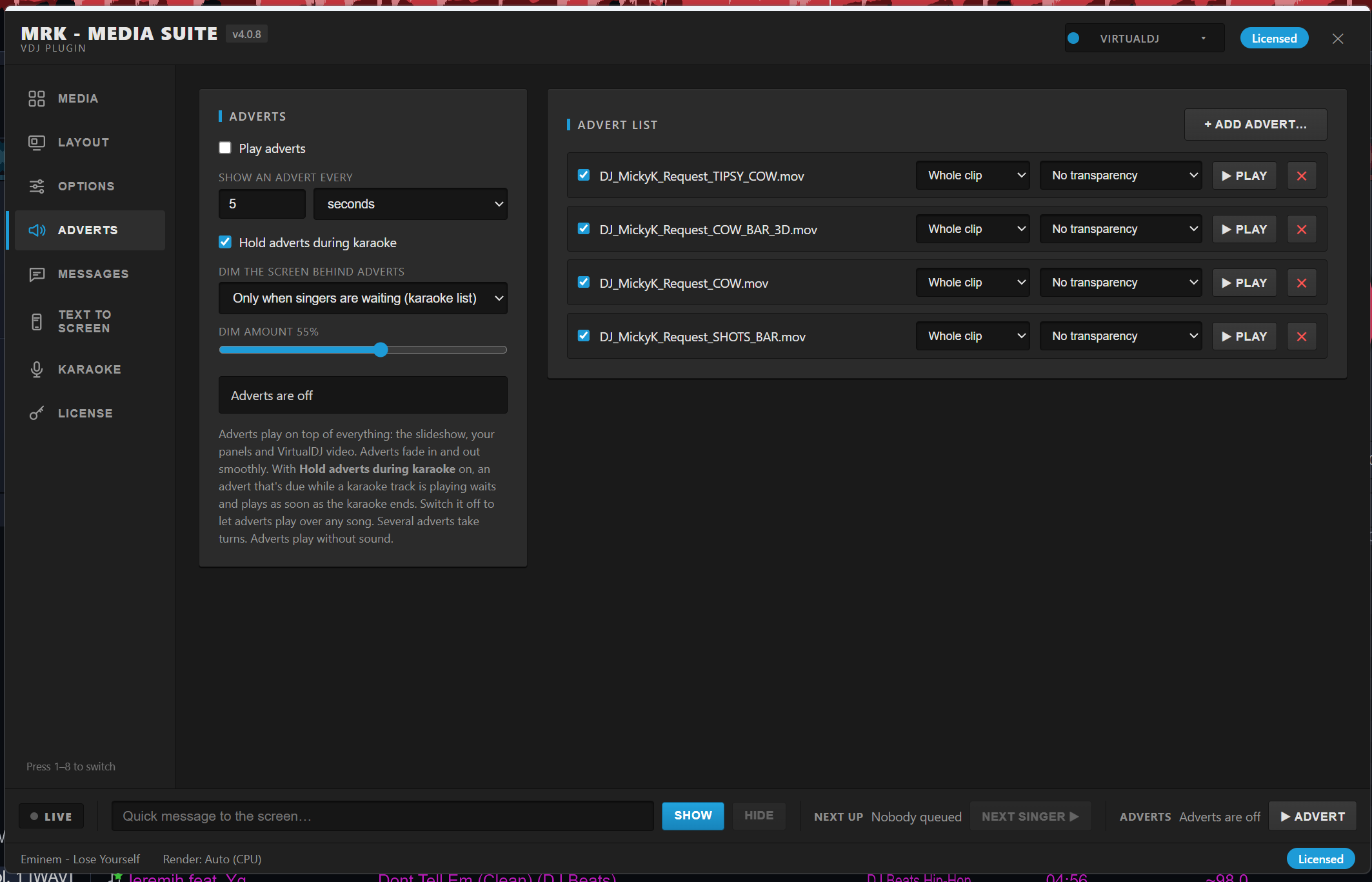
Scheduled advert rotation
Images, videos and transparent PNG-MOV adverts
Play whole clip or set duration
Play advert now
Green screen and black background removal
Smooth fade in and out
Dim the screen behind adverts
Hold adverts during karaoke
General
VirtualDJ video effect plugin (64-bit)
Modern HTML control panel
12 colour themes
Keyboard shortcuts for every tab
Quick-access live bar: message, next singer, adverts
One-click installer
Media
14 Media Vaults with 200 slots each
Custom vault names and colours
Images, videos and transparent PNG-MOV clips
Slideshow with timed delay
Cut, Fade and Crossfade transitions
Forward, Backward and Random order
Loop playback
Aspect Fit, Stretch and No Scale modes
Green screen and black background removal with adjustable strength
Auto, CPU and GPU render modes
Layout & Panels
Drag-and-drop layout editor
Main, Image, Text, Text 2, Shader, Now Playing, Video, Lyrics and Text to Screen panels
Layer ordering, copy, full screen and centre tools
Per-panel fonts, colours, opacity, outlines and backgrounds
11 text animations, including beat-reactive pulse, Typewriter, Wave and Neon
16 image animations, including Ken Burns and beat-reactive effects
Now Playing panel with scrolling and bounce
Looping video panels
Save and load layouts
Shaders & Visuals
27 built-in audio-reactive shaders across 2 packs
Load your own shaders (.cso / .vdjshader)
VDJ Shader Converter tool
Shader browser with previews
Auto-disable shaders on karaoke
Beat and audio sync
Lyrics
Automatic lyrics: online, from VirtualDJ, from MP3 tags or from lyric files
Synced, timed lyrics
Lyrics search and pick
Per-song timing adjustment
21 lyric styles: Karaoke fill, Bouncing ball, Spotlight, Word pop, Scrolling, Fade, Zoom in, Zoom out, Pulse, Slide up, Drop in, Echo zoom, Flip, Breathe, Word zoom, Word fade, Spin zoom and more
Countdown dots before vocals
Karaoke
Karaoke queue manager
VirtualDJ Karaoke list sync
“Next up” singer cards and banner
Auto-advance to the next singer
Auto-hide panels and slideshow during karaoke
Messages & Countdown
Live on-screen messages
Saved message list
Countdown timer with custom heading and finish message
Adjustable position, size and colours
Auto-hide during karaoke
Text to Screen
Guests text a number to put messages on screen
ClickSend and Twilio support
Auto-show or approve-first moderation
Blocked words filter
Phone numbers masked on screen
22 text designs, including Phone bubbles, Neon, Comic, Chat cards, Sticky notes, Frosted glass, Retro pixel, Social post, Chalkboard, Cinema marquee, Wedding and Clear
5 compact one-line designs
8 colour themes, including Party gradient
Big banner mode
Display time from 5 seconds to 10 minutes, or until the next text
Up to 8 texts on screen at once
On-screen “Text your shout-outs to…” prompt
Dedicated Text to Screen layout panel
Live inbox with show, hide and block controls
Test on screen
Adverts
Scheduled advert rotation
Images, videos and transparent PNG-MOV adverts
Play whole clip or set duration
Play advert now
Green screen and black background removal
Smooth fade in and out
Dim the screen behind adverts
Hold adverts during karaoke
MRK Media Suite v4.0.10 is out of Testing Phase
Please Follow the Installer provide
Release notes
4 releases · last updated 11 hours ago
New
Improved
Fixed
Bug fix
-
v4.0.13
Latest · 11.01 MB- New Auto Update detection notification on new releases
- New Clock styles: 35 styles in total, with 20 new today including Nixie Tube, Dot Matrix, Scoreboard
- New Hologram, Sport Chrono, Neon Dial, Chrome, Typewriter, Chalkboard, Terminal, Matrix, Vaporwave, Festive Bulbs, Binary, Progress Bars, Pie and Pill Badge.
- New Countdown panel styles: 26 of the clock styles now work on the Countdown panel.
- New Style menu: a dropdown with live previews, grouped categories and search, replacing the grid of tiles.
- Improved Messages tab rebuilt:
- Improved one list, with your old quick phrases moved in as favourites;
- Improved "Add to list" and "Add & show"; (THIS WILL BE REMOVE OR FIX PROPERLY IN THE NEXT COUPLE OF RELEASES)
- Removed ? favourites for the bottom-bar quick-pick, up to 10;
- New New New: a display time for each message;
- New New a live "ON SCREEN · 0:32 left" countdown bar.
- Improved More chroma keys on Video and Shader panels: Remove blue, Remove white, Remove a colour (colour picker) and Soft brightness key, with Tolerance, Edge softness and Remove colour spill controls.
- New Three new light themes: Daylight Warm, Daylight Mint and Sunlight (high contrast) for outdoor gigs. All four light themes now share the same readability fixes.
- New Panel rotation: any Layout panel can be rotated, in the editor and the real output. There's a rotate handle, Shift for 15° steps, 90° buttons, right-click options and the [ ] keys.
- New Pushbullet: confirmed connecting to your real account (it found your phone and read your texts).
- Fixed GIF crash: moving or resizing an image panel with a GIF garbled it, then crashed Virtual DJ. Fixed.
- Fixed Clock drawing: LED and Retro Alarm digits running off the edge, the date overlapping clock faces, cut-off Roman numerals, a missing Club Banner background and a blank Classic preview. All fixed.
- Fixed Wrong colours: Retro Alarm digits and the Analog Classic second hand were blue instead of red. Fixed.
- Fixed Messages page: "ON SCREEN" showing on every row, rows too narrow to read, and a stray extra input box. All fixed.
- Bug fix Theme dropdown: it was drawn behind the page. Fixed.
- Fixed Daylight theme: dark slot names and an invisible LIVE pill. Fixed.
-
v4.0.11a
· 8.44 MBMaintenance release.
-
v4.0.11
- Fixed Karaoke "Next up": when Virtual DJ keeps the current singer at the top of its karaoke list during their song, they are now skipped, so the next singer really is next.
- Bug fix GIFs: they now animate in Layout image panels and in Media Vault slots. Very large GIFs (over 300 frames, over 4096px, or more than 256 MB once decoded) stay on their first frame.
- New Rotation: there are two new modes, "Spin" and "Spin on beat". The old rocking modes are relabelled "Rock on beat" and "Pulse + Rock".
- Improved Media: a new "Play videos to the end" option, and "Delay" is now "Time to transition".
- Improved The menu is in his order, and Layout opens first.
- Improved Licence is now a section at the bottom of Options.
- Removed The Media Vault Names & Colours window is gone (right-click in Media already does this).
- Removed The themes are cut to 5: Pro Dark, VirtualDJ, Neon Club, Black & Gold and a new Daylight theme. Anyone using a removed theme falls back to Pro Dark.
- Improved The advert warning is bigger, Key strength now has a short explanation, and Layout has 8×8 and 16×16 snap grids.
- New New features
- New Clock and Countdown: both are new Layout panels. When a Countdown panel is showing, the old full-screen
- New countdown is hidden so it isn't drawn twice.
- New Fonts: any font installed on the computer can be picked for every text panel.
- New Quick message: up to 10 saved phrases on a ? button in the live bar. You can set the font, size and colour, and turn on a "From the DJ" label.
- Improved Text to Screen:
- New Messages can repeat when there's more than one.
- New A demo chat of up to 20 editable messages that never goes through a paid text service.
- New Smileys/emoji now display.
- New Chroma key: Video and Shader panels can remove green or black. For shaders, removing black lets the effect sit over the video.
- New Pushbullet: added as a third text service next to ClickSend and Twilio.
- New Clock panel: 15 styles
- New The styles are Classic, LED Digital, Flip Clock, Neon Tube, Glass Card, Minimal Line, Analog Classic, Analog Modern, Analog Roman, Ring, Retro Alarm, Club Banner, Word Clock ("IT'S TEN PAST TEN"), Label + Time and Gold Luxe.
- New You pick a style from a grid of preview tiles in the Clock panel settings, and the Layout preview ticks live.
- New Each clock can show 24-hour, 24-hour with seconds, or 12-hour with AM/PM. You can also show the date or the day name underneath, in the PC's language.
- New Each style follows the panel's colours, so you can recolour it. Label + Time lets you type your own heading, such as "BAR CLOSES".
- New Existing clock panels keep the Classic look, and saved layouts still load.
- New Checking the test images, I found and fixed three drawing faults:
- New The LED and Retro Alarm digits ran off the right edge.
- New The date line overlapped the round clock faces.
- New The Roman numerals were cut off ("VIII" showed as "VI").
- New Messages page
- New One list: "Saved messages" and "Quick phrases" are merged into one. Your existing quick phrases move into it automatically as favourites.
- New Favourites: each message has a ?. Favourites sit at the top of the list and are what the ? button in the bottom bar shows. You can have up to 10.
- New Time per message: each message has its own display time: Default, 10 s, 30 s, 1 min, 2 min, 5 min, or "Until I hide it".
- New Live countdown: the message currently on screen is highlighted with an "ON SCREEN" tag and "0:25 left", plus a bar that empties as its time runs out. Its Show button becomes Hide. "Until I hide it" shows "until hidden" with no bar.
- New Layout: typing a new message, Show and Save to list are now in the same card. Look, Quick message look and Countdown sit in the right-hand column, and the countdown itself works as before.
- Fixed fixed the GIF crash,
- Bug fix animated GIFs are pre-shrunk to the panel's size, one copy per frame, and kept in memory. Resizing the panel didn't throw those copies away. The plugin then read the old-size frames as if they were the new size, which is what produced the stripes in your screenshot. When the panel grew, it read past the end of the stored image, and that crashed Virtual DJ
-
v4.0.10
- MRK - Media Suite VirtualDJ Plugin v4.0.10 — features, updates and fixes
- New New Features
- Media Vault — multiple named, coloured vaults with 200 slots each; images and videos; drag-and-drop reordering; swap/move between vaults
- Slideshow mode — delay control, cut/fade/crossfade transitions, forward/backward/random order, looping
- Transparent .MOV support — PNG-alpha overlays keep their see-through areas on screen
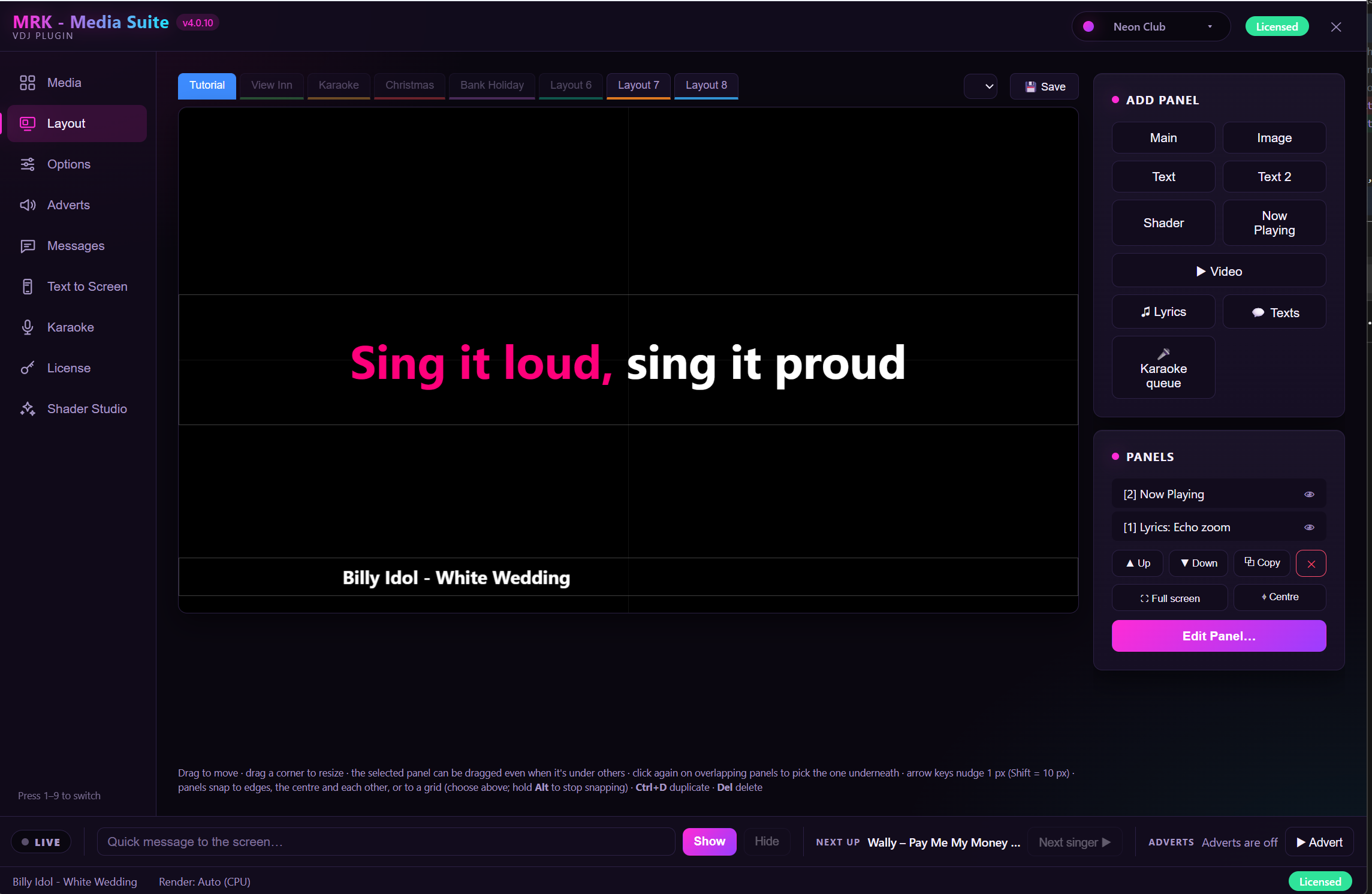
- Layout Designer — free-form overlay panels you drag, resize, snap and layer; duplicate, reorder, centre, full-screen; save named layouts across tabs
- Now Playing panel — live artist/title display with custom heading, scrolling ticker and styling
- Synced lyrics — VirtualDJ's own lyrics first, then .lrc files, embedded MP3 lyrics and online lookup; "Find lyrics" picker; 31 lyric display styles; line-start countdown styles; auto-hide on karaoke tracks
- Automatic lyric timing correction — learns the offset from the audio and saves it with the file, surviving renames and moves; manual ±0.2s/1s nudge
- Karaoke Queue — reads VirtualDJ's karaoke list live, "next up" card between songs, optional in-song banner, auto-advance, manual next/clear; 21 queue styles
- Adverts — scheduled video/image ads, screen-dim option, hold during karaoke, next-advert trigger
- Messages — live on-screen banners, saved message list, position/size/colour, countdown overlay with custom end message
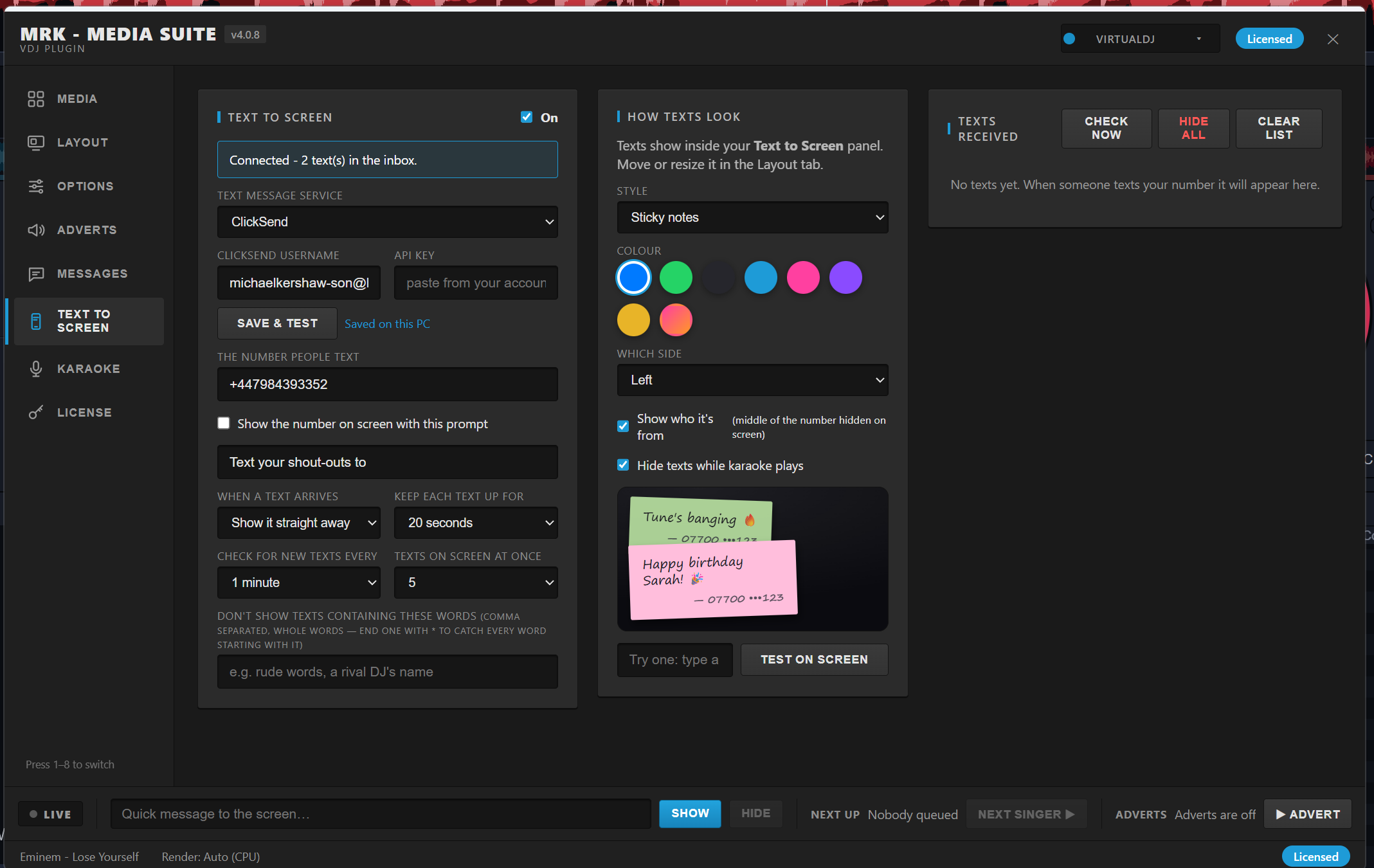
- Text to Screen (SMS) — audience texts via ClickSend or Twilio; approve-before-show or instant mode; up to 8 on screen; partial number masking; word filter; ~21 styles, colour themes, side placement; on-screen prompt; test preview
- Shaders — 126+ GPU visuals: 17 embedded effects, 10 Shader Pack 2 effects, plus every VirtualDJ shader with thumbnails; searchable browser; auto-disable during karaoke; beat/bass reactive
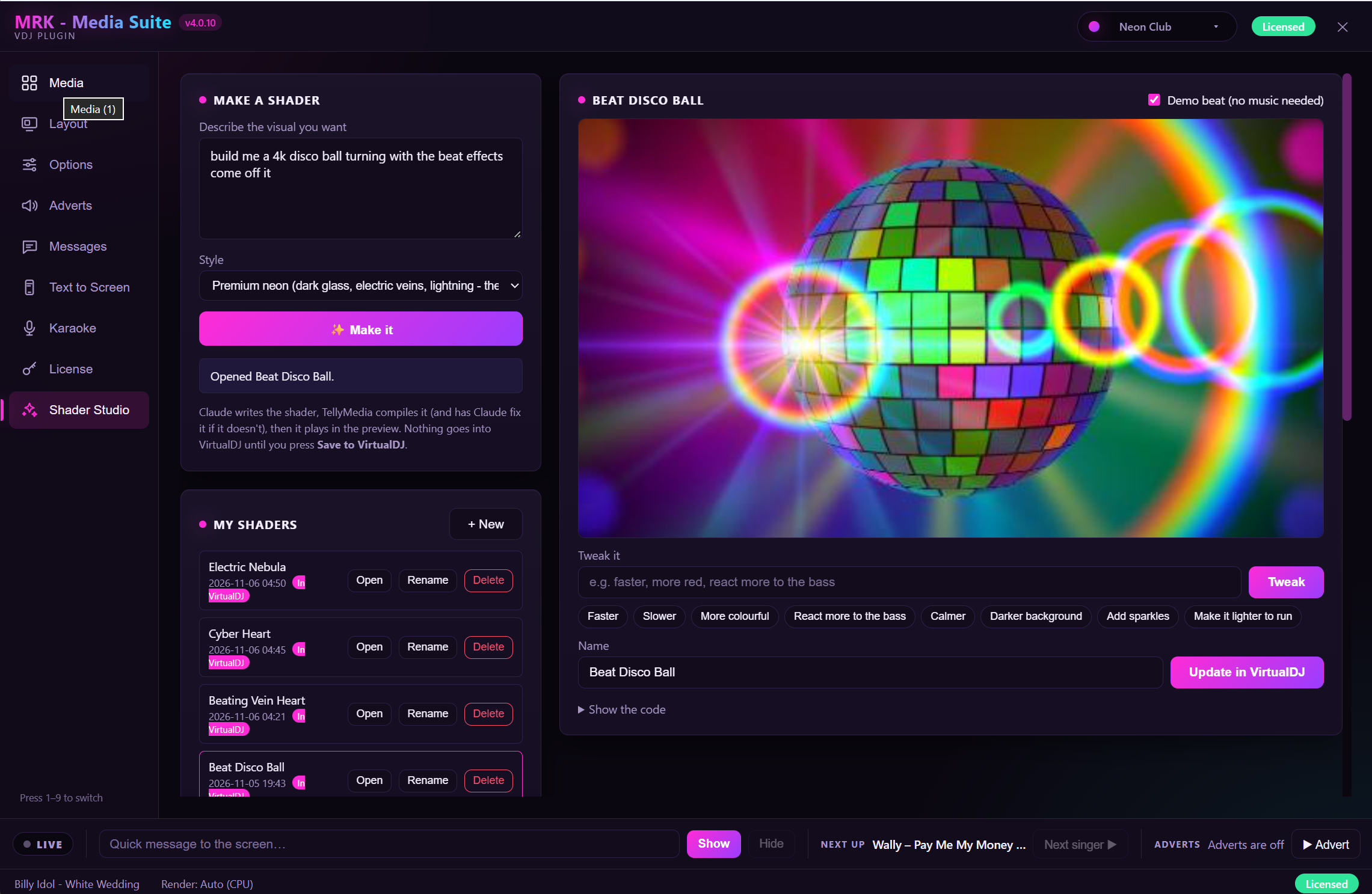
- Shader Studio — AI shader generator with plain-English tweaks, live preview, save straight into VirtualDJ
- 12 app themes — Neon Club, Pro Dark, VirtualDJ, Sunset, Ocean, Emerald, Black & Gold, Crimson and more
- Live control bar — quick message, next singer, advert trigger, countdown status
- Render mode choice — Auto / CPU / GPU
- HTML/CSS UI — modern themed interface rendered inside VirtualDJ via WebView2
More Virtual DJ plugins like this
All Video Effects plugins
MRK Media Suite - Virtual DJ
From $14.99